
Best Ergonomic Gaming Desks for Long Sessions: Performance, Comfort & Setup
Looking for the best ergonomic gaming desk for long sessions? Explore top gaming desks of 2026 designed for comfort, performance, cable management, and immersive setups — perfect for gamers, streamers, and serious multitaskers.
3/2/20267 min read
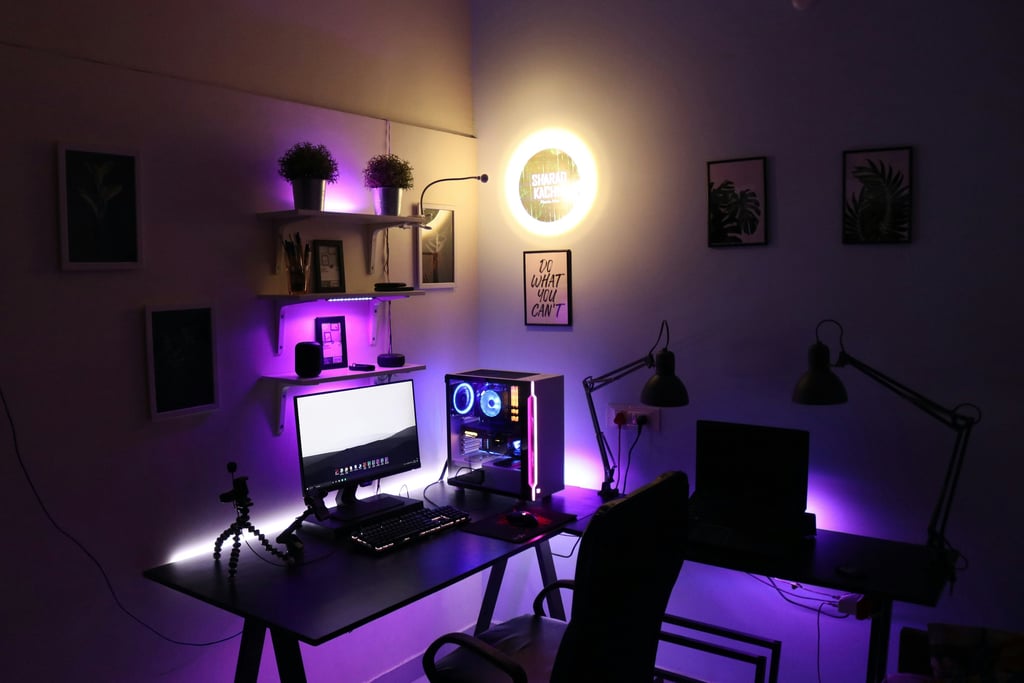
Introduction
Gaming chairs get most of the design attention, but your desk is just as important — especially if you sit for long hours gaming, streaming, studying, or working.
A bad desk contributes to:
1. Wrist strain
2. Shoulder tension
3. Poor posture
4. Neck discomfort
5. Back pain
6. Productivity loss
Choosing the right ergonomics gaming desk will solve these problems and it is more comfortable and productive during the long sessions.
Gaming desks are undoubtedly more than just plain tables with glowing RGB lights. They offer:
1. Adjustable heights (standing + sitting support)
2. Cable management solutions
3. Spacious layouts for multiple monitors
4. Curved or waterfall edges for wrist comfort
5. Long lasting materials that do not wobble
A well-designed ergonomic desk will transform your work and gaming experience, whether you are a competitive or creative gamer, as well as a student and a remote worker.
This blog simplifies the process of selecting the best ergonomic gaming desks when one is ready to spend a long time on them, showing what each desk has and why it is a great idea.
1. The Ultimate All-Around Ergonomic Workstation: Uplift V3 Standing Desk
The Uplift V3 Standing Desk is difficult to compete with in terms of being the most complete ergonomic desk.
What Makes It Special
The Uplift V3 desk is among the most customizable desks. It is constructed in such a way that you can easily sit and stand without any additional equipment.
Key Features
1. Electric lift adjustment: Motorized and smooth lift
2. Large height adjustment: Easy to sit or stand on depending on who is using it
3. Sturdy construction: Minimal wobble even at max height
4. Customizable desktop sizes: Fits small or large setups
Why It Is Comfortable enough to sit long hours
Another way of eliminating fatigue and stiffness is by changing your posture during the day. When you spend countless hours playing games or when you have Zoom calls and large projects, moving about will keep your body active.
Best For
Creators and Gamers who wish to be able to sit and stand without having to purchase additional accessories.
2. ApexDesk Elite Series – Best for Wide Setups and Multiple Monitors
ApexDesk Elite Series is a highly suitable option when you have more than one monitor, speakers, stream equipment, or consoles in your setup.
What Makes It Special
ApexDesk is known for strong motors and smooth height transitions.
Key Features
1. Large work surface: Supports two or more monitors
2. Dual motors: Reliable and balanced lifting
3. Solid stability: Very little shake even at tall heights
4. Electric height control: Easy to use buttons
Why It’s Great for Long Sessions
Space matters more than you think. When your desk feels jammed, your posture gets awkward and uncomfortable. The spacious ApexDesk keeps everything accessible and provides you with breathing room.
Best For
Streamers, multitaskers, and workstation setups with multiple screens or peripherals.
3. Herman Miller Motia Sit-to-Stand Desk: The Ultimate Premium Ergonomic Product
The Herman Miller Motia Sit-to-Stand Desk is a premium ergonomic desk that doubles as a high-end office workstation and gaming desk.
What Makes It Special
Herman Miller focuses on comfort and usability. Their desks shift seamlessly and feel stable at every height.
Key Features
1. Ultra smooth lifting action
2. Minimal wobble even with heavy equipment
3. Clean, modern design that fits any room
4. Excellent build quality that lasts years
Why It’s Comfortable for Long Use
Premium build and smooth transitions make it feel effortless to switch positions. You don’t have to think about your posture — the desk supports it naturally.
Best For
People who want premium comfort and durability without compromise.
4. FlexiSpot E7 Pro: The Most Customisable Desk for Personal Comfort
The FlexiSpot E7 Pro is one of the most adjustable ergonomic desks available it is perfect for those who spend hours working in front of a computer.
What Makes It Special
This desk lets you dial in exact comfort settings and store them in memory buttons.
Key Features
1. Programmable height presets
2. Wide height range for tall or short users
3. Strong motor and anti-collision safety
4. Optional accessories like keyboard trays and grommets
Why It Suits Long Sessions
Having multiple memory presets means you don’t have to manually adjust height every time. One button takes you from sitting to standing without interruption.
Best For
Anyone who shares a desk or likes custom presets for different activities.
5. Eureka Ergonomic Z1-S Pro Gaming Desk: The Greatest Option for Low-Cost Gamers
Not everyone needs a premium standing desk — and not everyone wants to spend big.
The Eureka Ergonomic Z1-S pro is a very good budget ergonomic gaming desk that still delivers comfort and functionality.
What Makes It Special
It combines a gamer-friendly aesthetic with practical ergonomic design.
Key Features
1. Sturdy steel frame
2. Adjustable height (manual crank)
3. Carbon fiber style top
4. Headphone and cup holders
5. Cable management tray
Why It’s Comfortable for Long Sessions
It keeps your necessities in order and in an easy access. The height adjustment is not motorized, but it is very stable and reliable.
Best For
Gamers, students, and remote workers who need the comfort of ergonomics but are not willing to pay high prices.
6. Autonomous SmartDesk Pro L – Best Smart Features
If you want basic automation and convenience, the Autonomous SmartDesk Pro L packs a lot of comfort features without unnecessary complexity.
What Makes It Special
It’s designed for daily use with minimal fuss, and it holds up well to extended sessions.
Key Features
1. Electric height adjustment
2. Programmable presets
3. Spacious work surface
4. Easy assembly
Why It’s Comfortable for Long Use
Simple controls and reliable motors mean you can switch posture quickly when fatigue sets in.
Best For
People who want a reliable standing desk without premium distractions.
7. Arozzi Arena Gaming Desk - Perfect for setups that are immersive
The Arozzi Arena Gaming Desk may be considered in case of wanting a desk that provides a gaming atmosphere.
What Makes It Special
It’s not an electric standing desk — but it’s ergonomically shaped for gamers.
Key Features
1. Curved edge design that keeps everything in reach
2. Large mouse pad surface built in
3. Cable routing holes
4. Very sturdy build
Why It’s Comfortable
The curved shape brings your keyboard and mouse closer, reducing shoulder strain. It’s especially helpful in intense gaming sessions where you want every movement within reach.
Best For
Console gamers, esports enthusiasts, and players with large peripheral setups.
8. The Best Desk with Integrated Features: X Rocker Pro Series H3
The X Rocker Pro Series H3 Gaming Desk provides in-built convenience to those players who prefer not to have a tabletop only.
What Makes It Special
It includes:
1. Cup holder
2. Headphone hanger
3. Monitor shelf for ergonomic eye level
Why It’s Comfortable
Integrated accessories keep your desk clutter-free and reduce unnecessary reach or twisting movements.
Best For
People who like built-in utility features in a gaming desk.
9. Cougar Mars Pro Gaming Desk – Best for Style + Functionality
The Cougar Mars Pro Gaming Desk is a newer but highly rated choice in 2026. It strikes a sweet balance between eye‑catching gamer style and practical ergonomic function — without compromising comfort during long sessions.
What Makes It Special
This gaming desk has been constructed keeping in mind the gamers but at the same time it provides real ergonomic qualities. It does not only make your set-up look flashy but also makes it easier to keep your set-up organized and comfortable, whether grinding ranked games, editing videos, or multitasking between apps.
Key Features
1. Racing‑style surface with textured carbon fiber finish — both looks and grip
2. Sturdy steel frame with anti‑tilt support — stable even with heavy setups
3. A desk with adjustable legs to make the desk even on sloping floors
4. Built in cable management rail - keeps cables in order and out of circulation
5. Accessory hooks and cup holder included — practical extras for long sits
Why It’s Comfortable
A good gaming desk isn’t just about height — it’s about organization and reach. The big flat area of the Cougar Mars Pro does not cram the monitors, keyboards, and mouse movements. The rough desk top also offers the appropriate level of resistance to allow the correct control of the mouse - useful in both FPS games and productivity.
The cable management rail keeps the cords in order without having to fumble behind the desk and the built-in hooks allow you to put the headset and cups in the very position you need them.
Best For
Gamers, casual streamers, and multitaskers who want:
1. A stylish but practical desk
2. Good space for peripherals
3. Extras like headphone holders and cable management
4. A setup that feels personal and organized
10. Secretlab Magnus Pro – Best Premium Cable Management Setup
The Secretlab Magnus Pro is built for people who care about a clean, powerful setup. It combines a strong steel design with one of the smartest cable management systems you can get in 2026. If messy wires frustrate you and you want your desk to look organized and professional, this desk stands out immediately.
What Makes It Special
It comes with a fully integrated power column and a magnetic cable system that hides almost every wire inside the desk itself. You don’t need extra cable trays or third-party accessories to keep things neat.
Key Features
1. Built-in power column with hidden cable routing
2. Magnetic cable management system
3. Smooth electric height adjustment
4. Durable steel tabletop for long-term stability
Why It’s Comfortable
When your desk is clutter-free, you naturally sit better and focus more. No cables in the way means no awkward hand positions or distractions. The electric height adjustment also lets you switch between sitting and standing easily, which helps reduce stiffness during long gaming or work sessions.
Best For
Minimalist setups, clean battlestations, streamers, and gamers who want a premium desk that stays organized and performs for years.
Selecting the Right Gaming Desk
The selection of the appropriate ergonomic gaming desk is based on:
1. How You Sit
Do you stand sometimes or only sit? Standing desks improve circulation and reduce stiffness.
2. Desk Size
Bigger setups need spacious surfaces. Select a larger desk if you have several screens.
3. Work Style
When you alternate work and gaming frequently, then a fixed desk is not as suitable as an adjustable desk.
4. Comfort Features
Look for curved edges, cable management, wrist rest compatibility, and customizable height.
5. Budget
Premium desks cost more but last longer. Budget models still offer excellent value.
Frequently Asked Questions
1. Are ergonomic desks effective in preventing back pains?
Yes. Correct height and posture support will aid in decreasing the strain on your spine when sitting on long periods.
2. Should gamers buy a standing desk?
Yes - alternating between standing and sitting enhances circulation and overcomes fatigue.
3. What is the most effective size of a desk when it is used with multiple monitors?
Two or more monitors are better on desks with minimum width of 55-60 inches.
4. Would you recommend manual or electric height adjustment?
Electric adjustment is more smoother and easy when one changes positions frequently.
5. How high should my desk be?
The desk must allow your elbows to be 90 degrees in typing or when playing a game to avoid the strain on the shoulders.
Final Thoughts
Your desk should support your body and your workflow — whether you’re gaming, creating, studying, or working.
Ergonomic desks do more than hold monitors and keyboards. They:
1. Encourage better posture
2. Reduce fatigue
3. Adapt to sitting and standing
4. Give you room to organize your setup
5. Improve long-session comfort
An investment in your productivity and well-being is a good desk.
Choose wisely — your body will thank you.
Sources
You May Also Like
10 Best Gaming Chairs for Long Sessions: Comfort & Performance
Best Laptops for Creators: Photo, Video, and Design Work Made Easy
Smart Device Security Tips: A Simple Guide to Protect Your Connected Home
Quick Links
© 2025 Gadget Nexus Pro. All rights reserved